Category:Instrument: Difference between revisions
Jump to navigation
Jump to search
No edit summary |
No edit summary |
||
| Line 5: | Line 5: | ||
The window will also inform you that you can change your lower your octave with the Z key and raise your octave with the X key. | The window will also inform you that you can change your lower your octave with the Z key and raise your octave with the X key. | ||
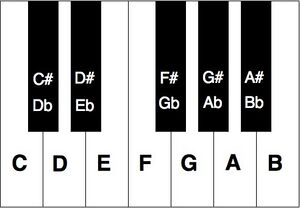
[[File:InstrumentKeys.jpg|center|300px|thumb|imagine the "C" note is on your A key.|link=]] | [[File:InstrumentKeys.jpg|center|300px|thumb|imagine the "C" note is on your A key. Play away!|link=]] | ||
Revision as of 06:14, 9 October 2025
After Right Clicking on an Instrument, or assigning it to a hotkey and using it, you can play music for everyone to hear!
A window will appear, changing you into "Instrument Mode" and altering your hotkeys so you can play your instrument.
The window will also inform you that you can change your lower your octave with the Z key and raise your octave with the X key.
Pages in category "Instrument"
The following 4 pages are in this category, out of 4 total.