Beginner's Guide: Difference between revisions
m (→Dungeons) |
|||
| (29 intermediate revisions by 2 users not shown) | |||
| Line 1: | Line 1: | ||
This is a spoiler- | This is a spoiler-light guide to the basics of Soul's Remnant, without any links to other pages in the wiki. Some information is omitted for the sake of maintaining that new player experience. | ||
Click on ''Expand'' to reveal information any information you'd like to read about. | |||
<div class="mw-collapsible mw-collapsed"> | |||
==Nighttime== | |||
<div class="mw-collapsible-content"> | |||
Night lasts for roughly twenty-two real world minutes, from 7pm to 5am in World Time. The background music changes, most maps grow dark and make every source of light that much more precious. | |||
And whatever other changes night may or may not bring is for you to discover. | |||
</div> | |||
</div> | |||
| | <div class="mw-collapsible mw-collapsed"> | ||
==Dungeons== | |||
<div class="mw-collapsible-content"> | |||
Dungeons contain valuable items within. Clearing a dungeon will net you some of those valuables, along with a good amount of Player EXP. To enter a dungeon you must first be in a party, and the party leader must have at least one type of Dungeon Pass in their inventory. Normal, Hard, or Extreme. Upon interacting [spacebar] with the floating crystal, a window will appear. The party leader must then drag their chosen Dungeon Pass into the designated box as an offering. Greater difficulties yield greater rewards, but they also demand that you fight harder foes. Good luck! | |||
After clicking "Enter", the offered Dungeon Pass will be erased from the party leader's inventory, and the party will be sent into the Dungeon Entrance. The dungeon's layout will be mapped in the upper right-hand corner of your screen as you progress. | |||
''Every dungeon that you enter is procedurally generated, making each run different from the last.'' | |||
When looking to do your first dungeon, we highly recommend doing a Normal Slime Garden run. If you need help finding where this dungeon might be, we recommend pressing the Up key on a certain sign in Outskirts Northwest. | |||
'''May your first dungeon run be a good one!''' | |||
</div> | |||
</div> | |||
<div class="mw-collapsible mw-collapsed"> | |||
==Death== | |||
<div class="mw-collapsible-content"> | |||
After taking lethal damage, you will be warped back to Spawn. While you wait, the screen will fade to black as a few messages appear on screen to tell you what you have lost: | |||
'''EXP loss''':<br> You lose 8% of your current level's EXP. | |||
'''Soul Crystal loss''':<br> You lose 3% of your soul crystals. | |||
<!-- '''IMPORTANT NOTE''': In Soul's Remnant ''it is possible to DOWNLEVEL''. When you die in Soul's Remnant, you lose EXP. If you lose enough EXP to go below 0, you will go down a level. This means it is entirely possible to downlevel back to level 1, if you die enough times. --> | |||
</div> | |||
</div> | |||
<div class="mw-collapsible mw-collapsed"> | |||
==Survival Tips== | |||
<div class="mw-collapsible-content"> | |||
While doing more damage is always great, it's important to keep yourself alive and healthy. In order to do that, here are a few tips! | |||
'''Joining a Guild'''<br> | |||
A helpful Guild is one of the best ways to keep yourself alive! Not only because you'll have people looking out for you, but also because of Guild Perks. There are a variety of perks, some of them being very handy in keeping you in the fight! | |||
'''CON'''<br> | |||
Try adding a few of your Stat points into CON. Even just 4 points into CON can noticeably increase your health pool, as well as increase your DEF by 1! | |||
'''Portal Crystals'''<br> | |||
When used, items like Return Crystals will create a portal directly behind its user. A Return Crystal, for example, will open a white portal that leads directly to Spawn. It's not only convenient, it can be absolutely life-saving! | |||
*''Note:'' Portal Crystals cannot be used near other portals. If you're fighting a dangerous enemy near a portal, don't waste time trying to use a crystal! | |||
'''Campfires'''<br> | |||
Placing a Campfire down will not only create a source of light in the map, but it will also increase the health recovery and mana recovery of everyone near it! You can't place any campfires down in a Dungeon, but that only shows how powerful they are! Keeping a few campfires on hand can be very convenient, if not outright necessary when trying to hunt down monsters above your level. | |||
*''Note:'' Campfires cannot be placed underwater. Don't venture into the beach or the ocean thinking you can use campfires! | |||
</div> | |||
</div> | |||
<center> | |||
[[File:Bowtie.png|100px|link=]] | |||
</center> | |||
==Menu Tips== | |||
We also want to help make menu navigation easier for any newcomers, so below are a few reminders and tips! | |||
Firstly, here are a few extra key combinations that are not shown anywhere in the game. | |||
*Toggle UI (F9) | |||
*Toggle Fullscreen (Control + F4) | |||
*Toggle FPS/Ping Viewer (Control + F3) | |||
Also, Middle Clicking your inventory or storage will organize it! | |||
==Chat Commands== | ==Chat Commands== | ||
| Line 74: | Line 90: | ||
{| class="wikitable" style="margin:left" | {| class="wikitable" style="margin:left" | ||
| /dps|| Calculates your Damage Per Second and displays it in the center of your screen. | |||
| / | |||
|- | |- | ||
| /guildinvite [name] || Invites a player to your guild. | | /guildinvite [name] || Invites a player to your guild. | ||
| Line 87: | Line 102: | ||
| /guildleave || Leaves your guild. | | /guildleave || Leaves your guild. | ||
|- | |- | ||
| / | | /housinghelp || Displays some commands for housing. | ||
|- | |- | ||
| / | | /housingperms [type] || Used to set who can build in your housing map. (Types can be: public, private, party, or guild) | ||
|- | |- | ||
| / | | /kill || Kills you. | ||
|- | |- | ||
| / | | /find [name] || Obtain the current map that that player is on. | ||
|- | |- | ||
| /save || Force save your data. Can be used once per a minute. (The game autosaves every once in a while, so this isn't super necessary) | | /save || Force save your data. Can be used once per a minute. (The game autosaves every once in a while, so this isn't super necessary) | ||
| Line 110: | Line 121: | ||
|} | |} | ||
== | ==Options Menu== | ||
You can access the Options Menu after pressing the ESC key. We recommend reading through all the tabs to see what you can do and how you can do it. Here are some notable details! | |||
''' | '''1)'''<br> Inside the ''General'' → ''General'' tab is a toggle for something called "Auto Strafe on Skill Use", and in the ''Controls → General'' tab is the option to bind your "Strafe" key. <br> | ||
Strafing refers to the ability to keep facing a chosen direction regardless of how you move. It can be a very useful tool in continuing to damage the enemy while walking away from them! | |||
'''2)'''<br> All the keybinds below "Strafe" in the ''Controls → General'' tab are related to Housing. Also, Campfires. <br> | |||
The "Build Tgl" key will help you close the Build interface. Remember that when sprucing up your home or setting up a campfire! | |||
'''3)'''<br> Pressing the "Hotbars" keybind, located in the ''Controls → Misc'' tab, will switch you between 3 states: Seeing your first hotbar → Seeing both hotbars → Seeing no hotbars ↻ <br> | |||
If Backslash (\) is not a "safe" enough keybind for you, we suggest assigning it to something safer. Accidentally removing your hotbars during a fight is the ''last'' thing you want to have happen. | |||
'''4)'''<br> And finally, inside the ''Controls → Misc'' tab are keybinds you can press to summon a collection of fun little emoticon. Use them as you please <3 | |||
==Quick Menu== | |||
Clicking the "Menu" button, which is in the bottom right corner of the screen by default, will open the "Quick Menu". Here's what it looks like: | |||
<div style="float:right; margin-left:10px;"> | |||
[[File:Exptracker.png|300px|link=|thumb|You can Right Click on one of the bars to reset it!]] | |||
</div> | |||
{| class="wikitable" style="margin:left" | {| class="wikitable" style="margin:left" | ||
| | |World Map (M) | ||
| | |- | ||
|Inventory Menu (I) | |||
|- | |||
|Equipment Menu (L) | |||
|- | |||
|Stats Menu (O) | |||
|- | |||
|Skills Menu (K) | |||
|- | |||
|Crafting (Comma) | |||
|- | |||
|Quests (Forward Slash) | |||
|- | |||
|Research Menu (B) | |||
|- | |||
|Buddies (Period) | |||
|- | |- | ||
| | |Party Menu (P) | ||
|- | |- | ||
| | |Guild Menu (N) | ||
|- | |||
| EXP Tracker | |||
|} | |} | ||
<!-- | |||
==Linking Discord== | |||
If we're making a Beginner's Guide, we should also talk about the linking to the Discord! | |||
In order to get Patreon benefits and use the Discord Bot, you need to link your accounts. To do this, you can find your account ID and Link Code by logging into the game, and typing: | |||
/account | |||
With that information in hand, you can DM @Wandering Soul through Discord and type: | |||
!help | |||
After following the instructions given to you, you need only wait for the link to happen. You can check your status by typing to @Wandering Soul: | |||
!checklink | |||
== | Once linked, you can use the Discord Commands! | ||
--> | |||
==Discord Commands== | |||
Commands for Discord :) | |||
{| class="wikitable" style="margin:left" | |||
|+ style= "text-align:left;"| In-Game Controls | |||
| Control + Left Click item within inventory || Shares the item on Discord for others to see! | |||
|} | |||
{| class="wikitable" style="margin:left" | {| class="wikitable" style="margin:left" | ||
|+ | |+ style= "text-align:left;"| Discord Controls | ||
| | | !rewards || Provides a step-by-step guide to getting Private Test Access for [https://patreon.com/chaomoon Patreon] supporters! | ||
|- | |- | ||
| | | !profile || Shows the badges you have on your Chaomoon Account. Your Discord account must be linked for this to work. | ||
|- | |- | ||
| | | !profile [account name] || Shows the badges a Chaomoon Account has. <!-- | ||
|- | |||
| !item [item name] || Gives a brief description of an item, as well as it's Item Rarity. | |||
|- | |||
| !skill [skill name] || Gives a brief description of a skill, as well as it's scaling. --> | |||
|} | |} | ||
<!-- | |||
==Attributes== | |||
Every time you level up, you gain 5 attribute points. These can be used to increase the various attributes: <span style="background:#e28080"> STR</span>, <span style="background:#cecd80"> DEX</span>, <span style="background:#80d9e2"> INT</span>, <span style="background:#959fdb"> SPR</span>, <span style="background:#db95d1"> CON</span>, and <span style="background:#c895db"> LUK</span>. More information on these attributes will be displayed if you hover your mouse over the icons in the attribute window. You can reset your attributes for free, with a cooldown of 1 hour. | |||
==Skills== | |||
You can learn skills from the Crafting Menu (M). Skills require soul crystals, skill points, and sometimes specific items in order to be learned. Once you learn a skill, you'll have it learned forever, but choose wisely because skill points are quite limited. If you end up not liking a skill, you can unlearn it by accessing the Skills Menu (K) and clicking on "Unlearn Skill" and following the instructions in the window that opens. | |||
Skills gain Skill EXP by using them. For example, you can level damaging skills only by last hitting enemies with said skill, healing skills by healing yourself/allies, or buffing skills by hitting enemies with any physical skill while the buff is in use. Skills can also gain EXP through the use of Skill Books, which are mainly found in dungeons. Some skills can only gain EXP with these books. Once a skill has enough EXP to level up, you must go into the Crafting Menu (M) and level upgrade it before the skill can earn any more Skill EXP. | |||
--> | |||
__NOTOC__ | |||
Latest revision as of 02:52, 13 October 2025
This is a spoiler-light guide to the basics of Soul's Remnant, without any links to other pages in the wiki. Some information is omitted for the sake of maintaining that new player experience.
Click on Expand to reveal information any information you'd like to read about.
Nighttime
Night lasts for roughly twenty-two real world minutes, from 7pm to 5am in World Time. The background music changes, most maps grow dark and make every source of light that much more precious.
And whatever other changes night may or may not bring is for you to discover.
Dungeons
Dungeons contain valuable items within. Clearing a dungeon will net you some of those valuables, along with a good amount of Player EXP. To enter a dungeon you must first be in a party, and the party leader must have at least one type of Dungeon Pass in their inventory. Normal, Hard, or Extreme. Upon interacting [spacebar] with the floating crystal, a window will appear. The party leader must then drag their chosen Dungeon Pass into the designated box as an offering. Greater difficulties yield greater rewards, but they also demand that you fight harder foes. Good luck!
After clicking "Enter", the offered Dungeon Pass will be erased from the party leader's inventory, and the party will be sent into the Dungeon Entrance. The dungeon's layout will be mapped in the upper right-hand corner of your screen as you progress.
Every dungeon that you enter is procedurally generated, making each run different from the last.
When looking to do your first dungeon, we highly recommend doing a Normal Slime Garden run. If you need help finding where this dungeon might be, we recommend pressing the Up key on a certain sign in Outskirts Northwest.
May your first dungeon run be a good one!
Death
After taking lethal damage, you will be warped back to Spawn. While you wait, the screen will fade to black as a few messages appear on screen to tell you what you have lost:
EXP loss:
You lose 8% of your current level's EXP.
Soul Crystal loss:
You lose 3% of your soul crystals.
Survival Tips
While doing more damage is always great, it's important to keep yourself alive and healthy. In order to do that, here are a few tips!
Joining a Guild
A helpful Guild is one of the best ways to keep yourself alive! Not only because you'll have people looking out for you, but also because of Guild Perks. There are a variety of perks, some of them being very handy in keeping you in the fight!
CON
Try adding a few of your Stat points into CON. Even just 4 points into CON can noticeably increase your health pool, as well as increase your DEF by 1!
Portal Crystals
When used, items like Return Crystals will create a portal directly behind its user. A Return Crystal, for example, will open a white portal that leads directly to Spawn. It's not only convenient, it can be absolutely life-saving!
- Note: Portal Crystals cannot be used near other portals. If you're fighting a dangerous enemy near a portal, don't waste time trying to use a crystal!
Campfires
Placing a Campfire down will not only create a source of light in the map, but it will also increase the health recovery and mana recovery of everyone near it! You can't place any campfires down in a Dungeon, but that only shows how powerful they are! Keeping a few campfires on hand can be very convenient, if not outright necessary when trying to hunt down monsters above your level.
- Note: Campfires cannot be placed underwater. Don't venture into the beach or the ocean thinking you can use campfires!

Menu Tips
We also want to help make menu navigation easier for any newcomers, so below are a few reminders and tips!
Firstly, here are a few extra key combinations that are not shown anywhere in the game.
- Toggle UI (F9)
- Toggle Fullscreen (Control + F4)
- Toggle FPS/Ping Viewer (Control + F3)
Also, Middle Clicking your inventory or storage will organize it!
Chat Commands
These are chat commands used within Soul's Remnant.
| /dps | Calculates your Damage Per Second and displays it in the center of your screen. |
| /guildinvite [name] | Invites a player to your guild. |
| /guildkick [name] | Kicks a player from your guild. |
| /guildaccept | Accepts a guild invite. |
| /guilddecline | Declines a guild invite. |
| /guildleave | Leaves your guild. |
| /housinghelp | Displays some commands for housing. |
| /housingperms [type] | Used to set who can build in your housing map. (Types can be: public, private, party, or guild) |
| /kill | Kills you. |
| /find [name] | Obtain the current map that that player is on. |
| /save | Force save your data. Can be used once per a minute. (The game autosaves every once in a while, so this isn't super necessary) |
| /time | Gives the current World Time. |
| /w [name] [message] | Used to send messages that only the specified, online player can see. Purple Text. |
| /p [message] | Used to send messages that only your party member(s) can see. Blue text. |
| /g [message] | Used to send messages that only your guildmate(s) can see. Green text. |
Options Menu
You can access the Options Menu after pressing the ESC key. We recommend reading through all the tabs to see what you can do and how you can do it. Here are some notable details!
1)
Inside the General → General tab is a toggle for something called "Auto Strafe on Skill Use", and in the Controls → General tab is the option to bind your "Strafe" key.
Strafing refers to the ability to keep facing a chosen direction regardless of how you move. It can be a very useful tool in continuing to damage the enemy while walking away from them!
2)
All the keybinds below "Strafe" in the Controls → General tab are related to Housing. Also, Campfires.
The "Build Tgl" key will help you close the Build interface. Remember that when sprucing up your home or setting up a campfire!
3)
Pressing the "Hotbars" keybind, located in the Controls → Misc tab, will switch you between 3 states: Seeing your first hotbar → Seeing both hotbars → Seeing no hotbars ↻
If Backslash (\) is not a "safe" enough keybind for you, we suggest assigning it to something safer. Accidentally removing your hotbars during a fight is the last thing you want to have happen.
4)
And finally, inside the Controls → Misc tab are keybinds you can press to summon a collection of fun little emoticon. Use them as you please <3
Quick Menu
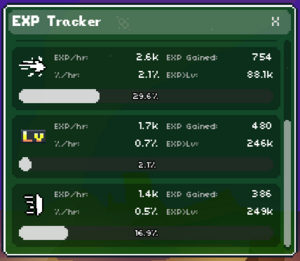
Clicking the "Menu" button, which is in the bottom right corner of the screen by default, will open the "Quick Menu". Here's what it looks like:
| World Map (M) |
| Inventory Menu (I) |
| Equipment Menu (L) |
| Stats Menu (O) |
| Skills Menu (K) |
| Crafting (Comma) |
| Quests (Forward Slash) |
| Research Menu (B) |
| Buddies (Period) |
| Party Menu (P) |
| Guild Menu (N) |
| EXP Tracker |
Discord Commands
Commands for Discord :)
| Control + Left Click item within inventory | Shares the item on Discord for others to see! |
| !rewards | Provides a step-by-step guide to getting Private Test Access for Patreon supporters! |
| !profile | Shows the badges you have on your Chaomoon Account. Your Discord account must be linked for this to work. |
| !profile [account name] | Shows the badges a Chaomoon Account has. |